
App Design | Branding | User Interface | Wireframing | User Testing
Background
Sports tracking and social sharing mobile app design. This was the final project in the Coursera course, UX Design: From Concept to Prototype.
Goals
Creating an easy to use sports tracking and social sharing application that allows users to reach their goals and track performance.
Problems
Beginning a new fitness journey goal can be daunting and easy to loose track of progress. Many people set goals but have hard time staying accountable.
Learnings
I leveraged data from user testing to refine my wireframes for the final design. I found that many users were confused with the sub navigation and felt overwhelmed by options. As an end-to-end designer, I was able to use typography and color for hierarchy to achieve an easy to use application.
User Personas

Julie
Demographics
-
Age: 35
-
Occupation: Writer
-
Personality: Extrovert
-
Technology literacy: Medium
Motivators
-
Wants to loose weight
-
To be able to share fitness activities with friends in her social circle
-
Wants to share her progress and goals on social media
Constraints
-
Will be busy as a full-time writer
-
Screen fatigue
-
Limited knowledge of fitness and health

Jessica
Demographics
-
Age: 27
-
Occupation: Dog Walker
-
Personality: Introvert
-
Technology literacy: High
Motivators
-
Track mileage with her wearable devices
-
See statistics each week to show clients
-
Share walking routes with other nearby
Constraints
-
Does not want to share all activities publicly
-
Device needs to sync with application
-
Logging activity manually takes too much time and needs to be automatic

Jonathan
Demographics
-
Age: 68
-
Occupation: Retired
-
Personality: Introvert
-
Technology literacy: Low
Motivators
-
Doctor recommended fitness regime
-
Needs to track and show progress
-
Feel more energized
-
Wants to be motivated
Constraints
-
Not used to mobile applications
-
Does not own a wearable device
-
Does not have social media to share activities
Paper Wireframes

App Login Screen
The initial CTA is to input user email and password. Assisting information includes to reset password or create an account for new users.

Input: New Activity
The user is uploading their new activity to the application. This page showcases options for the specific activity.

Output: Notification
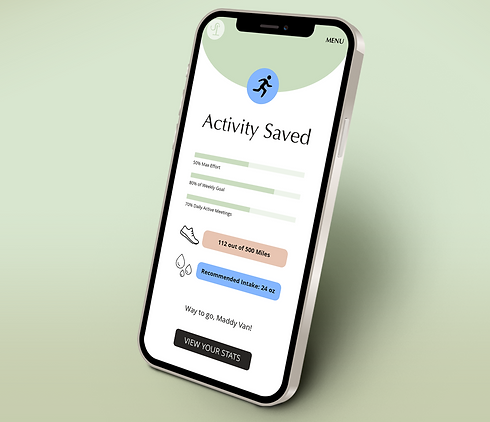
A new screen with show the new activity uploaded successfully. If sound is enabled an audio notification will ping the user.

Wearable Device
This is after syncing a wearable device. This screens shows the device data. It is broken down by activity type and day of the week it is being used.
User Testing

User tasks:
1. Open the Sports Tracker App and successfully create your user profile
2. Upload your new manual activity
3. Add John Smith as a friend and view their stats for biking


User feedback
Problem: In task 1, the user felt it was odd to add the profile photo at the end of the page since the tasks were shorter.
Solution: This is common to have the profile image one of the first things to add along with name. I would move the ‘add profile image’ to the top of the page by the name.
Problem: In task 2, the user selected to see all stats versus clicking the logo to go back to the home screen. They thought it was odd that the CTA was taking them to all stats versus back to home.
Solution: This could be a default in the app to always go back to the homepage after completing the activity. This would allow the user to see all recent activity versus the data intensive stats screen.
Final Look


